
Understand your store and find where to act.
Compare your sales, review what changed and check the details to decide what deserves your attention.
No credit card. Read-only connection.
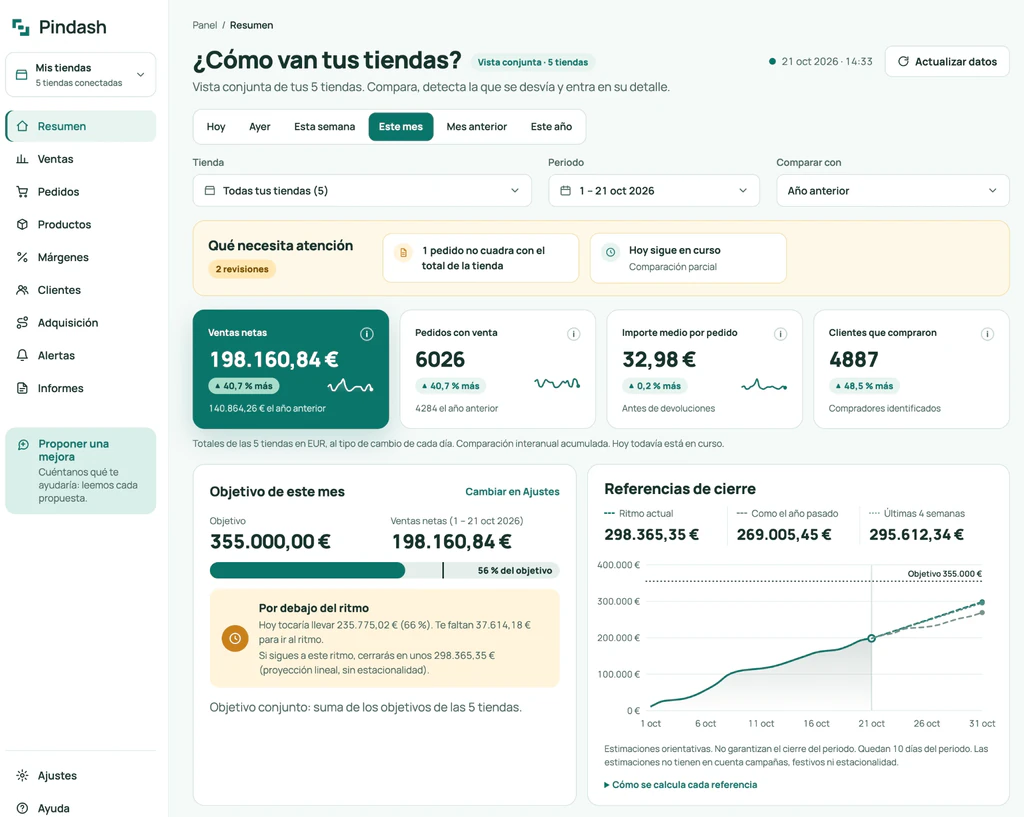
The Pindash dashboard · real screenshot from October 21, 2026 (Spanish interface), combined view of five stores
In the dashboard
Start by knowing how your store is doing.
Net sales excluding VAT, orders, average order value and refunds, always in context.
-
Compare like-for-like periods
The same range last year, or the previous period.
-
Track your monthly target
See whether the month is ahead of or behind pace.
-
Understand how every number is calculated
Each number explains what it includes and takes you to the orders behind it.
In the dashboard
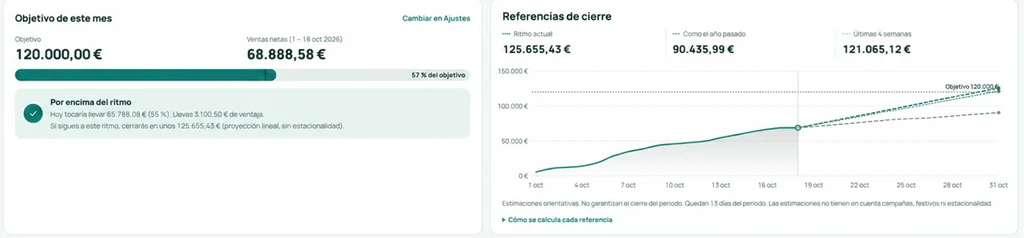
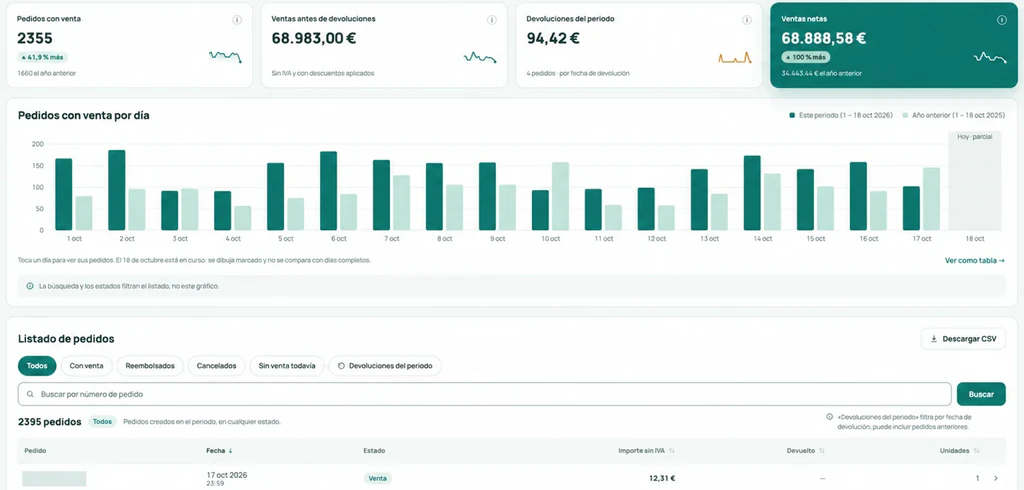
Follow a change down to the orders that explain it.
Compare periods, analyze the changes and review the order details to understand what happened.
Pick the days
Select a range on the chart to focus on what matters.
Review sales and refunds
Compare with the previous period or last year and spot changes.
Open the order details
See the orders in that range, with the order number you know from your store.
-
In the dashboard
Breakdown by country, payment and shipping
In Sales: sales by country, payment method, carrier and shipping charged. Sales by hour and by day of the week, in the Overview.
-
Sales by currency
Every order keeps its original amount and is converted at the exchange rate for its date.
- EUR
- USD
- MXN
- COP
- ARS
- PEN
-
CSV export
Download orders and products to keep working, with the same calculations as the dashboard. On every plan. Excel export is in development.
Know what sells and who comes back.
In the dashboard
Best-selling products, available stock with estimated days left, and new versus returning customers.
Products and stock
Units sold, stock on hand and days of stock left at the current sales pace.
| Product | Units | Stock | Days of stock (estimate) |
|---|---|---|---|
| Basic T-shirt | 124 | 80 | 18 days |
| Unisex hoodie | 96 | 21 | 6 days |
| Cotton cap | 64 | 55 | 24 days |
| Custom mug | 58 | 11 | 5 days |
| Tote bag | 41 | 62 | 42 days |
With no demand or with unmanaged stock, it shows “no estimate”.
Customers
Tell new and returning buyers apart across the available history.
- New68%1,115
- Returning32%524
Orders in the period
- 1 order1,42687%
- 2 or more21313%
Repeat buyers can be new or returning. Based on the history available in your store.
True Source · Pindash technology
See which channel brings in every sale.
In the dashboard
With True Source, every order carries its channel —organic search, campaigns, social media, email, referrals or direct— read from what your store saves with the order, not from what Google Analytics managed to measure. Net sales, orders, average order value and customers by channel, always with coverage up front. On WooCommerce, with nothing to install; on PrestaShop, with our free module, the same one that connects your store in one click.
See how True Source worksAcquisition by channel
97% of orders with a source · 254 of 262
| Channel | Share of sales | Net sales | Orders | Average order value |
|---|---|---|---|---|
| Organic Search | 39% | $5,020 | 104 | $48.27 |
| Paid Search | 18% | $2,360 | 41 | $57.56 |
| Direct | 17% | $2,145 | 47 | $45.64 |
| Organic Social | 8% | $984 | 23 | $42.78 |
| 6% | $799 | 17 | $47 | |
| AI Assistant | 5% | $642 | 12 | $53.50 |
| Referral | 4% | $530 | 10 | $53 |
| No data | 2% not reallocated | $316 | 8 | — |
-
Starts from all your sales
It doesn’t depend on a tag firing in the shopper’s browser: the source travels with the order.
-
Coverage up front
You always see how many of your orders have a source. The ones without one are shown separately, never counted as direct.
-
Every campaign, with what it sold
Campaigns tagged with UTM parameters show up inside their channel, with their sales.
Know if data is missing before you draw conclusions.
A confirmed zero and a pending update are two different things, and the dashboard tells you which one you’re looking at.
-
Data up to date
Last updated
Oct 16, 2026 · 2:22 p.m.The numbers are current.
-
Import in progress
Importing your orders: 64% complete.
In the meantime, we don’t show zeros that aren’t real.
-
Update pending
Last successful read
Oct 15, 2026 · 8:17 a.m.The most recent data hasn’t been downloaded yet.
Illustrative example · Last update time on every screen · History imported in stages · “Refresh data” on every plan, at most every 2 minutes
Keep track of the business without checking every screen.
In the dashboard
Get a summary by email, plus alerts when something needs your attention.
Daily summary
Yesterday’s sales and how the month is going, at 8:00 a.m. or at the time you choose. On Mondays it includes the week; on the 1st, the month’s close.
Alerts with context
Activity, connection or stock alerts worth a look, by email and in the dashboard.
Your store’s daily summary
To: you@yourstore.com
Oct 16, 2026 · 8:00 a.m.
Your store yesterday
- Net sales
- $2,584.32▲ 12.7%
- Orders
- 96▲ 8.2%
- Refunds
- 3$41.76
Compared with the same day last week. The month is 9% ahead of your target pace.
See details in Pindash →Alerts
- Products running out2 h ago3 items that usually sell will run out in 7 days or less.
- No orders coming in5 h agoNone in the last 3 hours; this time slot usually has about 6.
- Alert resolved6 h agoThe store is updating again: it recovered on its own.
In the dashboard · Pro and Business
Ask the AI you already use about your store.
Connect Pindash to Claude or ChatGPT through MCP. Your assistant reads the same numbers you see in the dashboard and helps you decide with real data.
Read-only access that you authorize and can revoke from your account; Pindash only sends data when you ask for it, and it’s always aggregated numbers that don’t identify your shoppers. Each connection allows up to 60 queries per minute. The connection is also included in the 14-day trial; using connectors may depend on your plan with your AI assistant.
See the plans that include itYou: What happened on Thursday that we sold 30% less?
Assistant: On Thursday the 8th there were 41 fewer orders than the Thursday before, and the average order value barely changed, so the difference is in the number of orders. Refunds are holding steady.
What I’d check first: stock for the 3 products with an alert, and the campaigns running that day.
Your team and your stores, all in one place.
In the dashboard
-
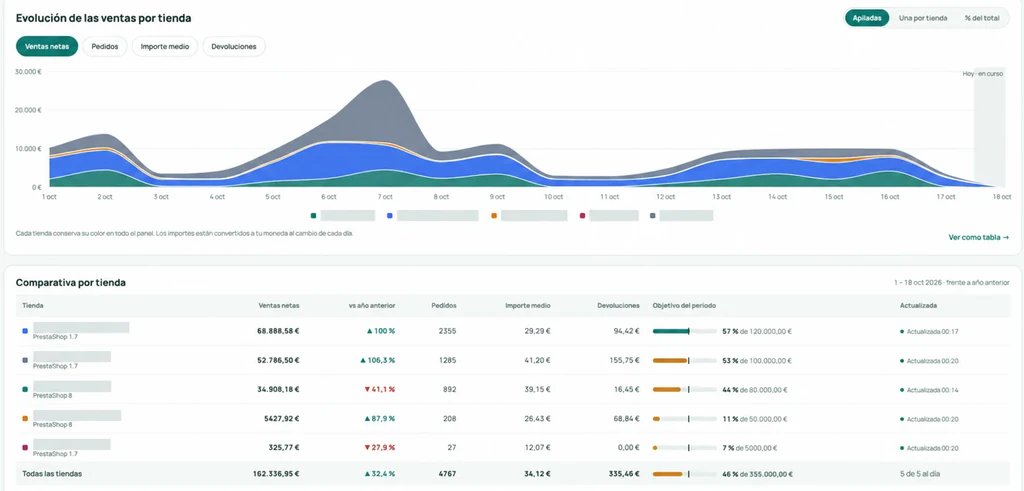
Multiple stores
PrestaShop and WooCommerce in the same account, with the total and a store-by-store comparison.
-
Users and permissions
Everyone signs in with their own user and a role: owner, admin or viewer.
-
On your phone, too
Install it as an app from your browser and check the dashboard wherever you need it.
Number of stores and users depends on the plan.
How much you make on what you sell.
Gross margin by product and by store, always showing how much of your sales has a cost.
-
In the dashboard
Margins and costs by product.
Using the cost your store saves with each order or the one you enter in Pindash (also from a CSV), on Pro and Business. No cost, no margin: we never assume 100%. Shipping, fees and advertising are shown separately.
- Selling price excl. VAT
- $29.90
- Product cost
- $12.40
- Gross margin
- $17.50 · 59%
Illustrative example
The dashboard is available in English and Spanish, with French to follow. A native iOS and Android app will depend on demand; today you can install the dashboard from your browser.
Try it with your own store’s data.
Start exploring your sales, products and customers.
No credit card. Your trial starts when you sign up.