


Skip to content

For PrestaShop and WooCommerce

See how much your online store sells and where every customer comes from.

Pindash is a sales dashboard for PrestaShop and WooCommerce: your real sales, the channel behind every sale with True Source, and your campaigns at a glance, plus a daily email every morning with what matters.

No credit card. Your trial starts when you sign up.

We only read your sales: we never change anything in your store

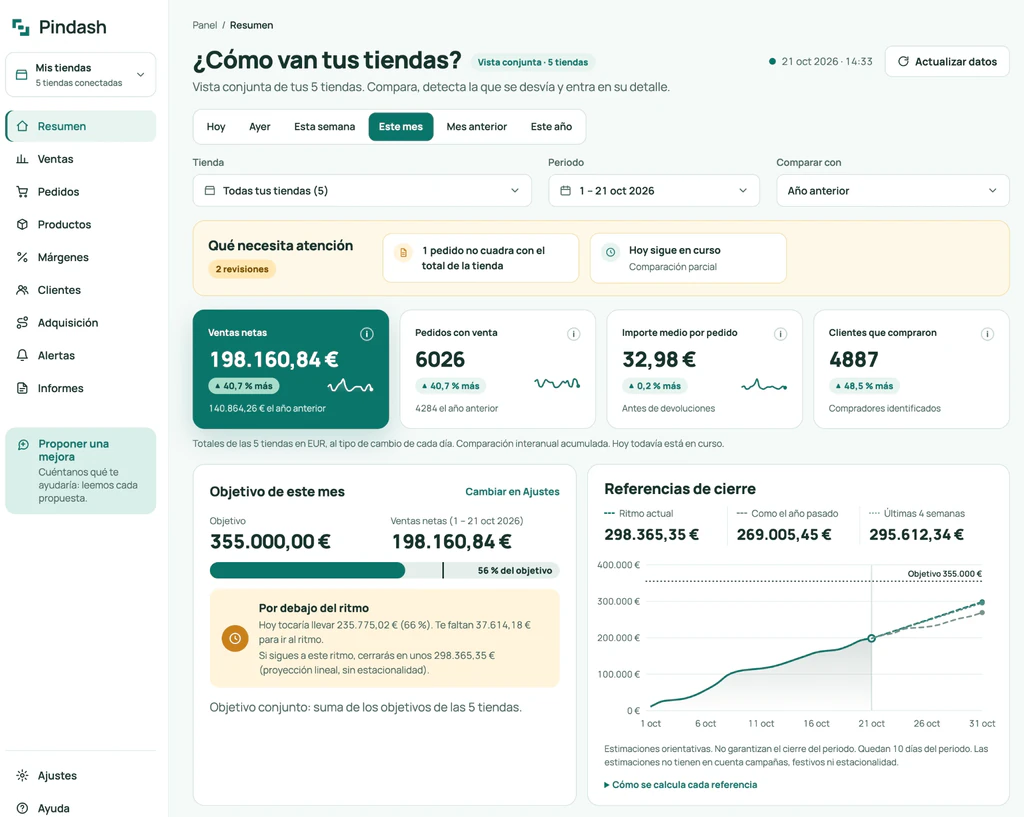
Pindash Overview with the full menu (Overview, Sales, Orders, Products, Margins, Customers, Acquisition, Alerts and Reports): what needs attention, net sales, orders with a sale, average order value, customers, monthly target and month-end forecasts for five stores. The interface in the screenshot is in Spanish.

The Pindash dashboard · real screenshot from October 21, 2026 (Spanish interface), combined view of five stores

See the demo

Know what deserves your attention.

Your store’s data, organized so you know what to check and where to spend your time.

  • Spot changes

    See what went up or down compared with the previous period or last year.

  • Track your monthly target

    See whether the month is ahead of or behind pace.

  • Check the details

    Open the orders to see what actually happened.

  • Plan your week

    Start Monday with a clear picture of your store.

True Source · Pindash technology

See which channel brings in every sale.

What Analytics misses, your store already saved. With True Source, Pindash tags every order with its channel —search, campaigns, social media or email— alongside what you actually got paid.

  • Built on your real sales. It reads the source your store saved with each order, not whatever a browser tag managed to record.
  • Coverage up front. You always see how many of your orders have a source; the ones without one are shown separately, never spread across channels.
  • Every campaign, with what it sold. Campaigns tagged with UTM parameters show up inside their channel.

WooCommerce: nothing to install. PrestaShop: with our free module, the same one that connects your store in one click.

See how it works

Acquisition by channel

This month · all stores

97% of orders with a source · 254 of 262

ChannelShare of salesNet salesOrdersAverage order value
Organic Search39%$5,020104$48.27
Paid Search18%$2,36041$57.56
Direct17%$2,14547$45.64
Organic Social8%$98423$42.78
Email6%$79917$47
AI Assistant5%$64212$53.50
Referral4%$53010$53
No data2% not reallocated$3168—
Illustrative example · the rows add up to $12,796 in net sales for the period

From the change to the detail, without getting lost.

  1. Compare periods

    See how your sales, orders and refunds are trending compared with last year.

  2. Pick the days

    Tap or drag on the chart to select a range and focus on what matters.

  3. Review what changed

    Look at the orders that made the difference.

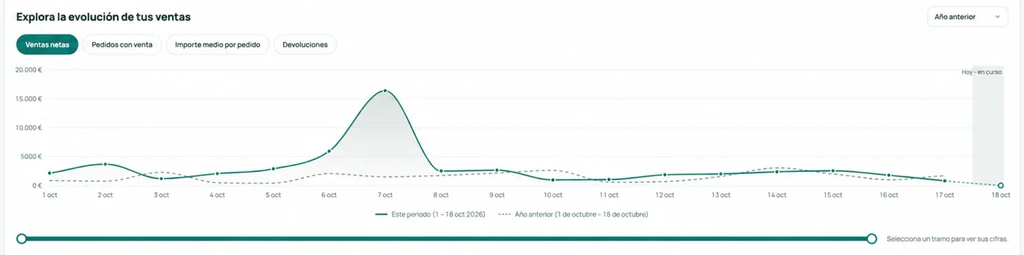
Chart of daily net sales compared with the previous year, with the range selector.
Explore sales, orders, average order value and refunds day by day, and select the range you want to review. Real dashboard screenshot (Spanish interface), October 1–18, 2026.

Ask the AI you already use about your store.

Connect Pindash to Claude or ChatGPT and ask about your sales using your store’s real data. Included in Pro and Business.

Claude · ChatGPT

See how it works

Which days should I look at this week?

According to Pindash, last week’s drop is concentrated on Thursday and Friday (−38%). Review the orders from those two days and compare them with the week before before you touch your campaigns.

Illustrative example
Your sales summaryToday, 8:00 a.m.
Yesterday’s sales$2,584.32▲ 12.7% vs. the same day last week
Month so far
Illustrative example

Start your day knowing what to check.

Every morning at 8:00 a.m. you get a summary of yesterday’s sales and how the month is going. When something catches your eye, open Pindash and dig into the details.

You can change the time, the days and the stores, or turn it off from your account. If some data hasn’t been updated yet, the email tells you.

Try it with your own store’s data.

  1. Create your account

    It only takes a minute.

  2. Sign the trial terms

    No commitment to pay.

  3. Connect your store

    And start seeing your data.

Signing the trial doesn’t start a paid subscription. Read the connection guide (in Spanish)

A plan for your volume

A plan for where your store is today.

14 days to try it with your own data. Subscribe once you’ve seen that it’s useful to you.

Basic

For keeping track of one store

$32 per month, excl. taxes

$307.20 per year, excl. taxes

or $307.20 a year (save 20%)

That’s $25.60/month, saving $76.80 compared with 12 monthly payments. Billed annually, upfront.

Up to 500 orders/month · 1 store · 1 user

  • Up to 24 months of history
  • Updates every 60 min, plus a manual refresh whenever you need it
  • Daily email with your key numbers
  • True Source: sales by source channel
  • Email support
Try free for 14 days

Pro

Up to 3 stores

For managing several stores from one place

$55 per month, excl. taxes

$528 per year, excl. taxes

or $528 a year (save 20%)

That’s $44/month, saving $132 compared with 12 monthly payments. Billed annually, upfront.

Up to 2,000 orders/month · 3 stores · 3 users

  • Up to 36 months of history
  • Updates every 15 min, plus a manual refresh whenever you need it
  • Daily email with your key numbers
  • True Source: sales by source channel
  • Email support
  • MCP connection to your AI assistant (Claude, ChatGPT…)
  • Margins and costs by product
Try free for 14 days

Business

For higher volume and a bigger team

$109 per month, excl. taxes

$1,046.40 per year, excl. taxes

or $1,046.40 a year (save 20%)

That’s $87.20/month, saving $261.60 compared with 12 monthly payments. Billed annually, upfront.

Up to 10,000 orders/month · 10 stores · 10 users

  • Up to 60 months (5 years) of history
  • Updates every 15 min, plus a manual refresh whenever you need it
  • Daily email with your key numbers
  • True Source: sales by source channel
  • Email support and priority WhatsApp support
  • MCP connection to your AI assistant (Claude, ChatGPT…)
  • Margins and costs by product
Try free for 14 days

Prices exclude taxes. Customers in the EU pay in euros (€29, €49, €99 + VAT where applicable); outside the EU you can pay in US dollars. Before subscribing, you’ll see the total that applies to your business. The annual plan covers 12 months and is billed upfront. The order limit is based on the average of the three previous full calendar months, excluding test orders and drafts. Compare all plans and limits

Before you start.

Answers to the most common questions, so you can start with all the information.

See all FAQs
Do I need to know about analytics?

No. You can start by comparing periods and looking at the days you’re interested in. Every number comes with an explanation of how it’s calculated.

What is True Source?

It’s Pindash’s technology for matching every sale to the channel it came from, using the source your store saves with the order rather than what Google Analytics managed to measure. On WooCommerce 8.5 or later it works with nothing to install; on PrestaShop, with our free module once you turn on attribution. You always see how many of your orders have a source. It’s included in every plan. See how it works

How do I connect my store?

On PrestaShop, install our free module and paste the code we give you: the module creates a read-only key for you and sends it to us. On WooCommerce, you approve read access from your store. The connection guide walks you through the steps. Pindash’s connection only reads data; it never changes orders, products or customers. If you turn on order sources in PrestaShop, the module saves the channel each order came from alongside the order.

Why do I have to sign for the trial?

The agreement covers the service during the trial and how we handle your store’s data. You can read it before accepting and download a copy. Signing doesn’t start a paid plan.

What can I do with the MCP connection?

Connect your AI assistant (Claude or ChatGPT) from Settings → AI assistants and ask it about your sales, orders, products and alerts, using the same numbers as the dashboard. It only reads aggregated data, you choose which stores it can access, and you can revoke access at any time. Included in Pro and Business, with up to 60 queries per minute per connection.

Will I be charged when the trial ends?

Creating an account and signing the trial terms doesn’t trigger any charge. If you subscribe during those 14 days, you’ll see the amount and the date of the first charge before you confirm; you’re charged when your trial ends.

Your next move, with the numbers in front of you.

Try free for 14 days

No credit card needed to start.